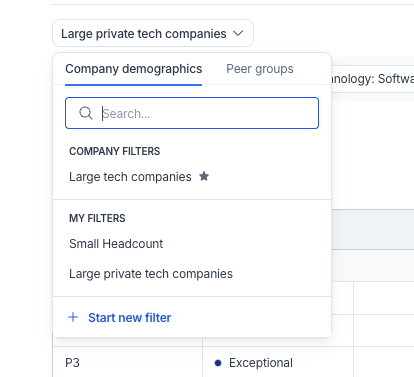
If you often rebuild the same filter sets in Market Data or Market Pricing—using the same peer group, locations, and job families—that process just got easier.
Market Data: Team Default View
You can now save a company-wide default filter set in Market Data. This ensures everyone starts from the same benchmarking context, improving consistency across sessions. When the team uses the same peer group and locations, benchmarks remain comparable and do not diverge over time.
For example, a compensation analyst benchmarking engineering roles across the US and UK no longer needs to rebuild the peer group and locations each time. Market Data loads the correct context automatically, allowing the session to begin with analysis rather than setup. Teammates accessing the same benchmark later see the same view, ensuring consistency.
Market Pricing: Save Your Workflow
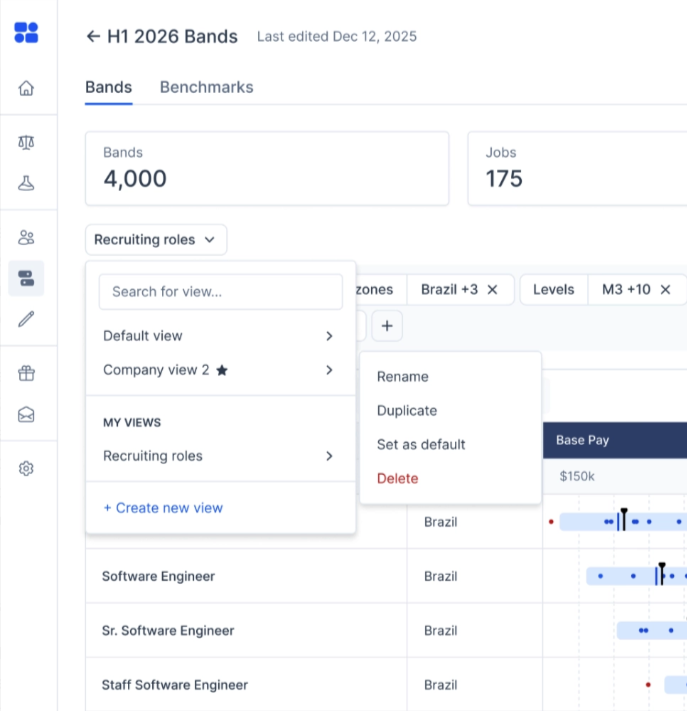
This feature is also now available in Market Pricing. Save your filters, sorting, and column order as a view, so you don't need to reset your workspace each time you open a range.
For example, a compensation manager reviewing pay ranges in Sales often sorts by market position and reviews the same columns—current range, midpoint, and last updated. Instead of recreating this layout for each review, she can now save it as a view. The next time she opens Market Pricing, she resumes her workflow without interruption, regardless of the department.
Why This Matters
This is more than a convenience. Consistent starting points mean your team makes faster, more confident decisions—without the risk of misalignment. Whether you’re analyzing benchmarks or reviewing pay ranges, you can focus on insights and strategy, not setup.
Default views are now live in Market Data and Market Pricing. Try them today and see how much simpler—and smarter—your workflow becomes.

Pave is a world-class team committed to unlocking a labor market built on trust. Our mission is to build confidence in every compensation decision.
FAQs:
What's the difference between a "default view" and a "saved view"?
In Market Data, a default view is a single, company-wide filter set — everyone starts benchmarking from the same peer group, locations, and context.
In Market Pricing, saved views are personal to each user — you save your own filters, sorting, and column arrangement so your workspace doesn't reset every session.
How do I set a default view in Market Data?
You'll set your filters and benchmarking context as usual, then save them as the company default from within Market Data.
Can I save different views in Market Pricing?
Yes. In Market Pricing, you can save your filters, sorting, and column arrangement as a view you return to, instead of rebuilding your workspace each time you open a range.
Does a company-wide default in Market Data affect my teammates?
Yes, that's the point of it. A shared default means everyone on the team starts benchmarking from the same context, so results stay comparable across analysts rather than drifting apart due to individual filter choices.
Can I change a saved or default view later?
Yes, both are meant to be updated as your team's needs change, not locked forever.
What's the benefit of using default and saved views?
Less time spent rebuilding the same filters every session, and more consistency across the team when everyone in Market Data works from the same benchmarking context.